

I worked on a simple Notes app recently to get to understand MVI architecture a bit more and I thought I’d share my learnings here. MVI (Model-View-Intent) is an architectural pattern used in Android development for building user interfaces in a way that is predictable, testable, and maintainable. MVI is built on three main concepts:
- The Model: represents the state of the UI at any given time. It serves as the single source of truth for the View. The state of the model is immutable, meaning each state change creates a new instance of the model. This immutability ensures the state is predictable and prevents unintended side effects.
- The View: is responsible for displaying the UI based on the current state (Model). MVI typically uses a declarative approach, allowing the View to automatically refresh when the state changes.
- The Intent: represents a user action or event that can alter the app’s state. Intents trigger business logic in the ViewModel to compute a new state and update the Model.
How MVI Works
- User Interaction: the user interacts with the UI (e.g., clicks a button), triggering an
Intent. - Intent Handling: the View sends the
Intentto the ViewModel. - Business Logic: the ViewModel processes the Intent, interacts with the data layer (if needed), and computes the new
Model(state). - State Update: the ViewModel emits the updated state back to the View.
- UI Update: the View observes the state changes and updates the UI accordingly.
To practically learn about how MVI works, I worked on a Notes app. It has two screens. The Notes list screen displays a list of notes from the local db. Clicking on the note redirects to a detail screen where users can update or add a new note.
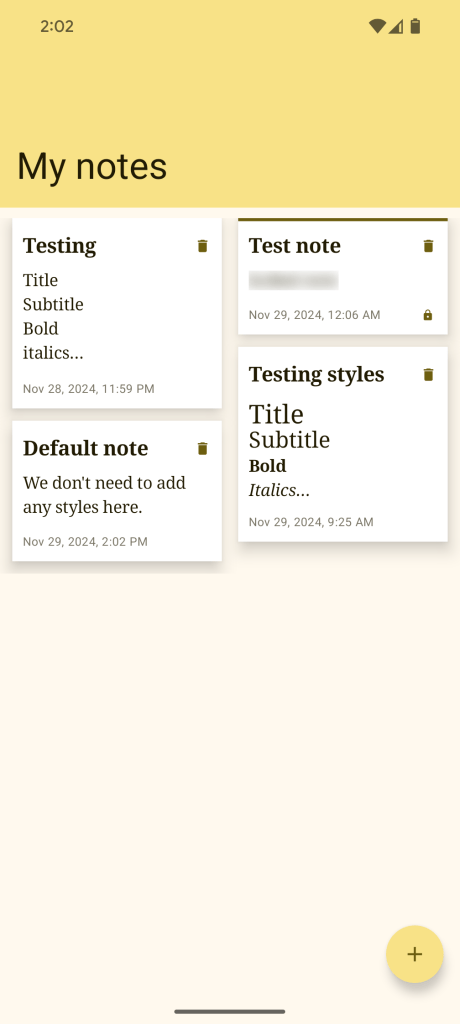
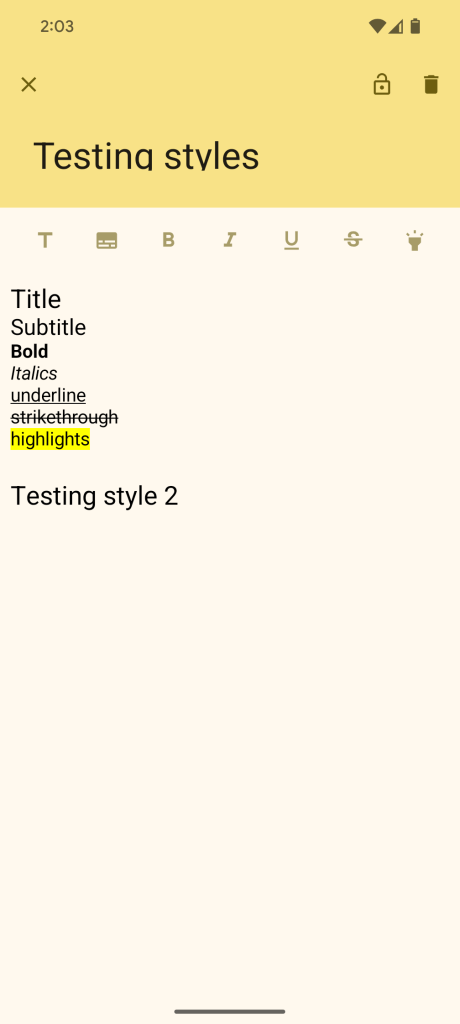
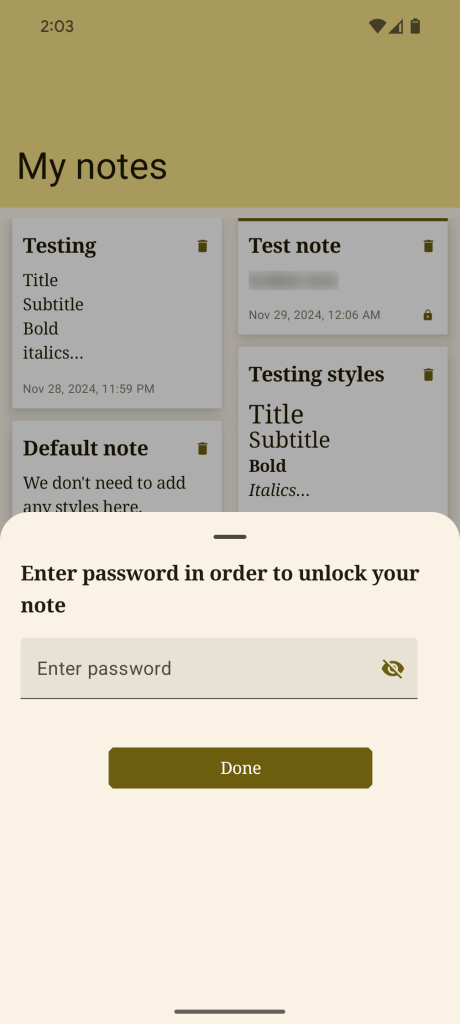
For those of you interested in skipping the article, the GitHub link is here. So let’s begin!
Step 1: Add dependencies
I have used Hilt and KSP (Kotlin Symbol Processing — similar to KAPT) for injecting our data layer with our UI layer. The other libraries used here are Room library for storing and retrieving the notes from the local db and gson converter for serialisation.
I have also used Gradle’s version catalogs to declare dependencies in the app. You can checkout my other articles on version catalogs and Hilt to get a deeper understanding of what is required here. For now, I’ll just share the relevant files used to add these dependencies.
| [versions] | |
| agp = "8.7.2" | |
| kotlin = "2.0.21" | |
| coreKtx = "1.15.0" | |
| junit = "4.13.2" | |
| junitVersion = "1.2.1" | |
| espressoCore = "3.6.1" | |
| lifecycleRuntimeKtx = "2.8.7" | |
| activityCompose = "1.9.3" | |
| composeBom = "2024.11.00" | |
| hilt = "2.52" | |
| hiltNavigationCompose = "1.2.0" | |
| ksp = "2.0.21-1.0.28" | |
| room = "2.6.1" | |
| mockitoKotlin = "5.2.1" | |
| coroutineTestVersion = "1.8.0" | |
| lifecycleRuntimeComposeAndroid = "2.8.7" | |
| gson = "2.11.0" | |
| [libraries] | |
| androidx-core-ktx = { group = "androidx.core", name = "core-ktx", version.ref = "coreKtx" } | |
| junit = { group = "junit", name = "junit", version.ref = "junit" } | |
| androidx-junit = { group = "androidx.test.ext", name = "junit", version.ref = "junitVersion" } | |
| androidx-espresso-core = { group = "androidx.test.espresso", name = "espresso-core", version.ref = "espressoCore" } | |
| androidx-lifecycle-runtime-ktx = { group = "androidx.lifecycle", name = "lifecycle-runtime-ktx", version.ref = "lifecycleRuntimeKtx" } | |
| androidx-activity-compose = { group = "androidx.activity", name = "activity-compose", version.ref = "activityCompose" } | |
| androidx-compose-bom = { group = "androidx.compose", name = "compose-bom", version.ref = "composeBom" } | |
| androidx-ui = { group = "androidx.compose.ui", name = "ui" } | |
| androidx-ui-graphics = { group = "androidx.compose.ui", name = "ui-graphics" } | |
| androidx-ui-tooling = { group = "androidx.compose.ui", name = "ui-tooling" } | |
| androidx-ui-tooling-preview = { group = "androidx.compose.ui", name = "ui-tooling-preview" } | |
| androidx-ui-test-manifest = { group = "androidx.compose.ui", name = "ui-test-manifest" } | |
| androidx-ui-test-junit4 = { group = "androidx.compose.ui", name = "ui-test-junit4" } | |
| androidx-material3 = { group = "androidx.compose.material3", name = "material3" } | |
| ## Hilt | |
| hilt-android-compiler = { group = "com.google.dagger", name = "hilt-android-compiler", version.ref = "hilt" } | |
| hilt-android = { group = "com.google.dagger", name = "hilt-android", version.ref = "hilt" } | |
| hilt-android-testing = { group = "com.google.dagger", name = "hilt-android-testing", version.ref = "hilt" } | |
| hilt-navigation-compose = { group = "androidx.hilt", name = "hilt-navigation-compose", version.ref = "hiltNavigationCompose" } | |
| ## Room | |
| room = { group = "androidx.room", name = "room-runtime", version.ref = "room" } | |
| room-compiler = { group = "androidx.room", name = "room-compiler", version.ref = "room" } | |
| room-ktx = { group = "androidx.room", name = "room-ktx", version.ref = "room" } | |
| ## Coroutine unit test – to unit test coroutines | |
| coroutine-test = { group = "org.jetbrains.kotlinx", name = "kotlinx-coroutines-test-jvm", version.ref = "coroutineTestVersion" } | |
| ## Mockito – to mock Dao/repository class in unit tests | |
| mockito-kotlin = { group = "org.mockito.kotlin", name = "mockito-kotlin", version.ref = "mockitoKotlin" } | |
| ## Lifecycle Compose | |
| androidx-lifecycle-runtime-compose = { group = "androidx.lifecycle", name = "lifecycle-runtime-compose-android", version.ref = "lifecycleRuntimeComposeAndroid" } | |
| ## Gson | |
| gson-converter = { group = "com.squareup.retrofit2", name = "converter-gson", version.ref = "gson" } | |
| [plugins] | |
| android-application = { id = "com.android.application", version.ref = "agp" } | |
| jetbrains-kotlin-android = { id = "org.jetbrains.kotlin.android", version.ref = "kotlin" } | |
| compose-compiler = { id = "org.jetbrains.kotlin.plugin.compose", version.ref = "kotlin" } | |
| hilt = { id = "com.google.dagger.hilt.android", version.ref = "hilt" } | |
| ksp = { id = "com.google.devtools.ksp", version.ref = "ksp" } | |
| // Top-level build file where you can add configuration options common to all sub-projects/modules. | |
| plugins { | |
| alias(libs.plugins.android.application) apply false | |
| alias(libs.plugins.jetbrains.kotlin.android) apply false | |
| alias(libs.plugins.compose.compiler) apply false | |
| alias(libs.plugins.ksp) apply false | |
| alias(libs.plugins.hilt) apply false | |
| } |
| plugins { | |
| alias(libs.plugins.android.application) | |
| alias(libs.plugins.jetbrains.kotlin.android) | |
| alias(libs.plugins.compose.compiler) | |
| alias(libs.plugins.ksp) | |
| alias(libs.plugins.hilt) | |
| } | |
| android { | |
| namespace = "com.an.notesapp" | |
| compileSdk = 35 | |
| … | |
| } | |
| dependencies { | |
| implementation(libs.androidx.core.ktx) | |
| implementation(libs.androidx.lifecycle.runtime.ktx) | |
| implementation(libs.androidx.activity.compose) | |
| implementation(platform(libs.androidx.compose.bom)) | |
| implementation(libs.androidx.ui) | |
| implementation(libs.androidx.ui.graphics) | |
| implementation(libs.androidx.ui.tooling.preview) | |
| implementation(libs.androidx.material3) | |
| // Hilt | |
| implementation(libs.hilt.android) | |
| implementation(libs.hilt.navigation.compose) | |
| ksp(libs.hilt.android.compiler) | |
| kspAndroidTest(libs.hilt.android.compiler) | |
| androidTestImplementation(libs.hilt.android.testing) | |
| // Room | |
| implementation(libs.room) | |
| implementation(libs.room.ktx) | |
| ksp(libs.room.compiler) | |
| // Gson convertor | |
| implementation(libs.gson.converter) | |
| // lifecycle compose | |
| implementation(libs.androidx.lifecycle.runtime.compose) | |
| // Coroutine unit test dependency | |
| testImplementation(libs.coroutine.test) | |
| // Mockito | |
| testImplementation(libs.mockito.kotlin) | |
| testImplementation(libs.junit) | |
| androidTestImplementation(libs.androidx.junit) | |
| androidTestImplementation(libs.androidx.espresso.core) | |
| androidTestImplementation(platform(libs.androidx.compose.bom)) | |
| androidTestImplementation(libs.androidx.ui.test.junit4) | |
| debugImplementation(libs.androidx.ui.tooling) | |
| debugImplementation(libs.androidx.ui.test.manifest) | |
| } |
We also need to create a custom Application class and annotate it with @HiltAndroidApp and add it to our Manifest file.
| @HiltAndroidApp | |
| class NoteApp: Application() |
Step 2: Define Model layer
Now that we have our dependencies, we need to create a model class that holds our Note data.
| @Entity | |
| data class Note( | |
| @PrimaryKey(autoGenerate = true) | |
| val id: Long = 0, | |
| val title: String, | |
| val description: String, | |
| val encrypt: Boolean = false, | |
| val password: String? = null, | |
| @ColumnInfo(name = "created_at") | |
| val createdAt: OffsetDateTime = OffsetDateTime.now(), | |
| @ColumnInfo(name = "modified_at") | |
| val modifiedAt: OffsetDateTime | |
| ) |
We should be able to create our Dao and Database class using Room.
| /** | |
| * DAO's are data access objects. They includes methods that offer abstract access | |
| * to the app's database. At compile time, Room automatically generates implementations | |
| * of the DAOs that we define. | |
| */ | |
| @Dao | |
| interface NoteDao { | |
| @Insert(onConflict = OnConflictStrategy.REPLACE) | |
| suspend fun insertNote(note: Note): Long | |
| @Update | |
| suspend fun updateNote(note: Note) | |
| @Delete | |
| suspend fun deleteNote(note: Note) | |
| @Query("SELECT * FROM Note") | |
| fun fetchAllNotes(): Flow<List<Note>> | |
| @Query("SELECT * FROM Note WHERE id =:noteId") | |
| fun getNote(noteId: Long): Flow<Note> | |
| } |
| /** | |
| * [NoteDatabase] defines the database configuration and serves as the app's main access point | |
| * to the persisted data. The database class must satisfy the following conditions: | |
| * 1. The class must be annotated with a @Database annotation that includes an entities | |
| * array that lists all of the data entities associated with the database. | |
| * 2. The class must be an abstract class that extends RoomDatabase. | |
| * 3. For each DAO class that is associated with the database, the database class must | |
| * define an abstract method that has zero arguments and returns an instance of the DAO class. | |
| */ | |
| @Database(entities = [Note::class], version = 1, exportSchema = false) | |
| @TypeConverters(TimestampConverter::class) | |
| abstract class NoteDatabase: RoomDatabase() { | |
| abstract fun noteDao(): NoteDao | |
| } |
We also create a Repository class that interacts with the NoteDao class to fetch/add/update/delete notes from the db.
| class NoteRepository @Inject constructor( | |
| private val noteDao: NoteDao | |
| ) { | |
| suspend fun insertNote(note: Note) = noteDao.insertNote(note) | |
| suspend fun updateNote(note: Note) = noteDao.updateNote(note) | |
| suspend fun deleteNote(note: Note) = noteDao.deleteNote(note) | |
| fun getNotes(): Flow<List<Note>> = noteDao.fetchAllNotes() | |
| fun getNote(noteId: Long): Flow<Note> = noteDao.getNote(noteId) | |
| } |
Step 3: Define ViewState & Intent
The NoteUiViewState class is the single source of truth for the UI in the notes list screen. It holds all the necessary data required to represent the current state of the UI.
| /** | |
| * A data class representing the UI state for displaying notes in the app. | |
| * This class is used to encapsulate the state of the UI in a single immutable object. | |
| * The immutable nature of the state guarantees that each update leads to a predictable | |
| * UI change, helping prevent bugs and ensuring smooth interactions. | |
| * | |
| * @param isLoading Indicates whether the UI is currently in a loading state. | |
| * @param notes A list of notes to display in the UI. Defaults to an empty list. | |
| */ | |
| data class NoteUiViewState( | |
| val isLoading: Boolean = false, | |
| val notes: List<Note> = emptyList() | |
| ) |
The NoteIntent sealed class encapsulates all the possible actions a user can take on the app. Each intent is a specific user interaction that leads to a change in the application state.
| /** | |
| * A sealed class representing all possible user actions (via intents). | |
| * This helps to encapsulate and categorize user inputs in a type-safe and maintainable way, | |
| * making it easier to handle these actions in a centralized manner (e.g., in a ViewModel). | |
| * By using a sealed class for intents, MVI ensures that each possible user interaction is | |
| * explicitly defined, making it easier to manage different actions in a structured way. | |
| */ | |
| sealed class NoteIntent { | |
| /** Represents the intent to load a list of all notes. */ | |
| object LoadNotes : NoteIntent() | |
| /** Represents the intent to load a specific note, possibly by ID. */ | |
| object LoadNote : NoteIntent() | |
| /** | |
| * Represents the intent to add a new note or save changes to an existing note. | |
| * The exact behavior depends on the application context (e.g., whether editing or creating). | |
| */ | |
| data object AddOrSaveNote : NoteIntent() | |
| /** | |
| * Represents the intent to update the title of a note. | |
| * @param title The new title for the note. | |
| */ | |
| data class UpdateNoteTitle(val title: String) : NoteIntent() | |
| /** | |
| * Represents the intent to update the description of a note. | |
| * @param description The new description for the note. | |
| */ | |
| data class UpdateNoteDescription(val description: String) : NoteIntent() | |
| /** | |
| * Represents the intent to delete a note. | |
| * @param note The note to be deleted. | |
| */ | |
| data class DeleteNote(val note: Note) : NoteIntent() | |
| /** | |
| * Represents the intent triggered when a note is clicked or opened. | |
| * @param note The note that was clicked or selected. | |
| */ | |
| data class OpenNoteClicked(val note: Note) : NoteIntent() | |
| } |
Step 4: Define ViewModel & EventManager
The NotesViewModel class plays a crucial role in managing the UI’s state and handling user interactions in an MVI-based architecture. It inherits from the ViewModel class, which provides lifecycle awareness and makes it possible to manage UI-related data efficiently, especially during configuration changes like screen rotations.
| /** | |
| * The ViewModel class manages the UI state and handling user interactions. | |
| * It serves as the bridge between the repository and the UI, ensuring unidirectional data flow. | |
| * This ViewModel uses Hilt for dependency injection and manages state using StateFlow. | |
| * | |
| * @param repository The repository responsible for performing data operations related to notes. | |
| */ | |
| @HiltViewModel | |
| class NoteViewModel @Inject constructor( | |
| private val repository: NoteRepository | |
| ) : ViewModel() { | |
| /** | |
| * A private MutableStateFlow to store and update the UI state for the notes screen. | |
| */ | |
| private val _notesViewState = MutableStateFlow(NotesViewState()) | |
| /** | |
| * A public immutable StateFlow exposing the current UI state. | |
| * The UI observes this flow to react to state changes. | |
| */ | |
| val notesViewState: StateFlow<NotesViewState> = _notesViewState | |
| /** | |
| * Upon creation, the ViewModel immediately triggers a LoadNotes | |
| * intent to fetch and display the current user list. This automatic | |
| * loading of data when the ViewModel is initialized ensures that the | |
| * UI is always populated with up-to-date information when the notes | |
| * screen appears. | |
| */ | |
| init { | |
| handleIntent(NoteIntent.LoadNotes) | |
| } | |
| /** | |
| * Handles user intents by mapping them to appropriate methods. | |
| * This ensures that all user actions are processed in a centralized, predictable manner. | |
| * | |
| * @param intent The user action to be handled. | |
| */ | |
| fun handleIntent(intent: NoteIntent) { | |
| when (intent) { | |
| is NoteIntent.LoadNotes -> loadNotes() | |
| is NoteIntent.DeleteNote -> deleteNote(intent.note) | |
| is NoteIntent.OpenNoteClicked -> onNoteClicked(intent.note) | |
| is NoteIntent.ValidatePassword -> validatePassword(intent.password) | |
| else -> { /* No-op for unsupported intents */ } | |
| } | |
| } | |
| /** | |
| * The loadNotes function performs the following steps: | |
| * 1. Set Loading State: Updates the state to indicate that a loading process | |
| * is in progress by setting isLoading = true. | |
| * 2. Retrieve Data: Using viewModelScope.launch, it asynchronously fetches | |
| * the list of notes from the repository. | |
| * 3. Update State: Once the data is fetched, the state is updated with the | |
| * new notes list, and the loading flag is set to false to indicate that | |
| * the loading process is complete. | |
| * 4. Trigger Effect: A snackbar effect is sent to notify the user that the | |
| * data has been successfully loaded. | |
| * This function ensures that the UI accurately reflects the loading status and the | |
| * notes list, following the MVI pattern’s principles of immutability and | |
| * state management. | |
| */ | |
| private fun loadNotes() { | |
| _notesViewState.value = _notesViewState.value.copy(isLoading = true) | |
| viewModelScope.launch(IO) { | |
| repository.getNotes().collect { notes -> | |
| _notesViewState.value = _notesViewState.value.copy( | |
| isLoading = false, | |
| notes = notes | |
| ) | |
| } | |
| } | |
| } | |
| /** | |
| * Deletes a note via the repository and triggers a snackbar event to notify the user of success. | |
| * | |
| * @param note The note to be deleted. | |
| */ | |
| private fun deleteNote(note: Note) { | |
| viewModelScope.launch(IO) { | |
| repository.deleteNote(note) | |
| EventManager.triggerEvent(AppEvent.ShowSnackbar(R.string.delete_note_success)) | |
| } | |
| } | |
| /** | |
| * Handles the user clicking on a note. | |
| * If the note is encrypted, prompts the user to enter a password. | |
| * Otherwise, navigates to the note detail screen. | |
| * | |
| * @param note The note that was clicked. | |
| */ | |
| private fun onNoteClicked(note: Note) { | |
| if (note.encrypt) { | |
| _notesViewState.value = _notesViewState.value.copy( | |
| selectedNote = note, | |
| showPasswordSheet = true | |
| ) | |
| } else { | |
| EventManager.triggerEvent(AppEvent.NavigateToDetail(note.id)) | |
| } | |
| } | |
| } |
In addition to managing the state, the ViewModel handles one-time events (or side effects) such as displaying a snackbar message or redirecting to the detail screen, using a Channel. Since these one-time events will be application wide, we are creating an EventManager class.
| /** | |
| * A singleton object responsible for managing application-wide events in a reactive manner. | |
| * It provides an easy way to trigger and observe events using Channel. | |
| * This is particularly useful in unidirectional data flow architecture (MVI). | |
| */ | |
| object EventManager { | |
| /** | |
| * A buffered channel to send and receive application events. | |
| * This channel ensures that events are stored temporarily until they are consumed. | |
| */ | |
| private val eventChannel = Channel<AppEvent>(Channel.BUFFERED) | |
| /** | |
| * A Flow that emits events as they are sent through the channel. | |
| * Observers can collect this flow to react to events in a non-blocking manner. | |
| */ | |
| val eventsFlow = eventChannel.receiveAsFlow() | |
| /** | |
| * Triggers an event by sending it to the event channel. | |
| * This function is non-blocking and runs on a background thread. | |
| * @param event The event to trigger. | |
| */ | |
| fun triggerEvent(event: AppEvent) { | |
| CoroutineScope(Dispatchers.Default).launch { eventChannel.send(event) } | |
| } | |
| /** | |
| * A sealed class representing all possible types of application events. | |
| * This allows for strongly typed event handling with a clear structure. | |
| */ | |
| sealed class AppEvent { | |
| /** | |
| * Represents an event to display a Snackbar with a message. | |
| * @param message The string resource ID for the message to display. | |
| */ | |
| data class ShowSnackbar(@StringRes val message: Int) : AppEvent() | |
| /** | |
| * Represents an event to navigate to a detail screen for a specific note. | |
| * @param noteId The ID of the note to display in detail. | |
| */ | |
| data class NavigateToDetail(val noteId: Long) : AppEvent() | |
| } | |
| } |
Step 5: Add UI layer
| @AndroidEntryPoint | |
| class MainActivity : ComponentActivity() { | |
| @OptIn(ExperimentalMaterial3Api::class) | |
| override fun onCreate(savedInstanceState: Bundle?) { | |
| super.onCreate(savedInstanceState) | |
| enableEdgeToEdge() | |
| setContent { | |
| NotesAppTheme { | |
| val context = LocalContext.current | |
| // Initializes a navigation controller to handle navigation between screens. | |
| val navController = rememberNavController() | |
| // Creates a state to manage snackbar messages. | |
| val snackbarHostState = remember { SnackbarHostState() } | |
| // Provides a coroutine scope for displaying snackbar. | |
| val coroutineScope = rememberCoroutineScope() | |
| // Observes global app events from EventManager and reacts accordingly. | |
| LaunchedEffect(EventManager) { | |
| lifecycleScope.launch { | |
| // Ensures that event collection only happens while the lifecycle is in the STARTED state. | |
| lifecycle.repeatOnLifecycle(Lifecycle.State.STARTED) { | |
| EventManager.eventsFlow.collect { event -> | |
| when (event) { | |
| is AppEvent.ShowSnackbar -> { | |
| coroutineScope.launch { | |
| snackbarHostState.showSnackbar( | |
| context.stringResource(event.message), | |
| duration = SnackbarDuration.Short | |
| ) | |
| } | |
| } | |
| // Navigates to the detail screen of a specific note. | |
| is AppEvent.NavigateToDetail -> { | |
| navController.navigate( | |
| ROUTE_DETAIL_PATH.replace( | |
| "{$ROUTE_DETAIL_ARG_NAME}", | |
| "${event.noteId}" | |
| ) | |
| ) | |
| } | |
| else -> { /* No-op for unsupported events */ } | |
| } | |
| } | |
| } | |
| } | |
| } | |
| MainApp( | |
| navController = navController, | |
| snackbarHostState = snackbarHostState | |
| ) | |
| } | |
| } | |
| } | |
| } |
The MainApp composable is the central piece of the notes app UI. It is responsible for rendering the entire UI and interacting with the ViewModel to reflect the application’s current state. This composable follows MVI principles, ensuring a unidirectional data flow and handling state management and effects (like snackbar notifications) in a reactive manner.
| /** | |
| * The main composable function for setting up the app's UI structure. | |
| * It defines the scaffold layout, navigation, and other top-level elements for the app. | |
| * | |
| * @param navController The navigation controller for managing app navigation. | |
| * @param snackbarHostState The state for displaying snackbars in the app. | |
| */ | |
| @OptIn(ExperimentalMaterial3Api::class) | |
| @Composable | |
| fun MainApp( | |
| navController: NavHostController, | |
| snackbarHostState: SnackbarHostState | |
| ) { | |
| // Defines a scroll behavior for the top app bar, enabling it to collapse on scroll. | |
| val scrollBehavior = TopAppBarDefaults.exitUntilCollapsedScrollBehavior( | |
| rememberTopAppBarState() | |
| ) | |
| // Observes the current back stack entry to determine the navigation state. | |
| val currentBackStackEntry by navController.currentBackStackEntryAsState() | |
| // Determines if the back button should be shown, based on the navigation stack. | |
| val showBackButton by remember(currentBackStackEntry) { | |
| derivedStateOf { navController.previousBackStackEntry != null } | |
| } | |
| // Defines the scaffold structure, which includes the top app bar, snackbar host, and floating action button. | |
| Scaffold( | |
| snackbarHost = { SnackbarHost(hostState = snackbarHostState) }, // Host for displaying snackbars. | |
| topBar = { | |
| // The top app bar, which dynamically displays a back button based on the navigation state. | |
| MainTopAppBar( | |
| navController = navController, | |
| showBackButton = showBackButton, | |
| scrollBehavior = scrollBehavior | |
| ) | |
| }, | |
| modifier = Modifier.nestedScroll(scrollBehavior.nestedScrollConnection) // Ensures nested scrolling works with the top bar. | |
| ) { innerPadding -> | |
| // Sets up the navigation host, which manages the composable destinations in the app. | |
| NavHost( | |
| navController = navController, | |
| startDestination = ROUTE_HOME, // The starting destination of the app. | |
| modifier = Modifier | |
| .padding(innerPadding) // Ensures padding for the scaffold's content area. | |
| .fillMaxSize() // Ensures the navigation content fills the available space. | |
| ) { | |
| // Defines the home screen route. | |
| composable(route = ROUTE_HOME) { | |
| val noteViewModel = hiltViewModel<NoteViewModel>() // Retrieves the NoteViewModel using Hilt. | |
| NotesScreen(viewModel = noteViewModel) // Displays the list of notes. | |
| } | |
| } | |
| } | |
| } |
The NotesScreen composable observes the state changes from the ViewModel and updates the UI reactively.
| /** | |
| * A composable function that displays the main notes screen in the app. | |
| * This screen dynamically updates its content based on the UI state provided by the ViewModel. | |
| * | |
| * @param viewModel The ViewModel that provides the state and handles user interactions. | |
| */ | |
| @Composable | |
| fun NotesScreen( | |
| viewModel: NoteViewModel | |
| ) { | |
| // Observes the UI state from the ViewModel using StateFlow and lifecycle-aware collection. | |
| val noteUiState = viewModel.notesViewState.collectAsStateWithLifecycle( | |
| lifecycleOwner = LocalLifecycleOwner.current | |
| ) | |
| // Provides a title for the app bar. | |
| ProvideAppBarTitle { | |
| Text( | |
| modifier = Modifier | |
| .fillMaxWidth(), | |
| text = stringResource(id = R.string.app_name), // Displays the app name as the title. | |
| style = MaterialTheme.typography.displaySmall, | |
| color = MaterialTheme.colorScheme.onSecondaryContainer | |
| ) | |
| } | |
| // Displays a loading indicator if the state indicates loading. | |
| if (noteUiState.value.isLoading) { | |
| LoadingItem() | |
| // Displays an empty screen message if there are no notes to show. | |
| } else if (noteUiState.value.notes.isEmpty()) { | |
| EmptyScreen() | |
| // Displays the list of notes if the state contains notes. | |
| } else { | |
| LazyVerticalStaggeredGrid( | |
| modifier = Modifier.padding(top = 10.dp, bottom = 10.dp, start = 12.dp, end = 12.dp), | |
| horizontalArrangement = Arrangement.spacedBy(16.dp), | |
| columns = StaggeredGridCells.Adaptive(minSize = 140.dp), // Dynamically adjusts columns based on screen size. | |
| ) { | |
| val notes = noteUiState.value.notes | |
| items(notes.size) { | |
| val note = notes[it] | |
| NoteItem( | |
| note = note, | |
| onNoteItemClicked = { viewModel.handleIntent(NoteIntent.OpenNoteClicked(it)) }, // Handles note click. | |
| onNoteItemDeleted = { viewModel.handleIntent(NoteIntent.DeleteNote(it)) } // Handles note deletion. | |
| ) | |
| } | |
| } | |
| } | |
| } |
The NoteItem composable implementation can be found here and the entire implementation can be found here.
And that’s pretty much it folks! I hope this was useful and happy coding!

 DevAndAndroid
Leave a comment